Account Preferences
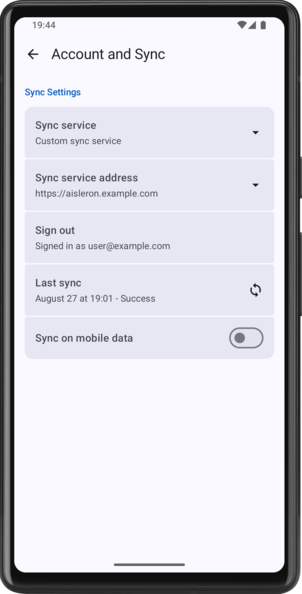
The Account Preferences page is used to configure the Aisleron Sync Service, and the account used to sync.
The following settings are available:
Sync Settings
Sync service: The service to use for syncing. Available options are:
- None: Disables the sync service completely.
- Custom sync service: Connect to your own instance of the Aisleron Sync Service.
Sync service address: Only available when Custom sync service is selected. Configure the connection parameters for the custom sync service. See Sync Service address configuration for details.
Sign in / Sign out: Sign into, or out of, the sync service. When signing in, this will redirect to the Sign in page.
Last sync: The last time the sync service was run. Tap to force a sync.
Sync on mobile data: Turn sync on mobile data on or off.
Sync Service address configuration
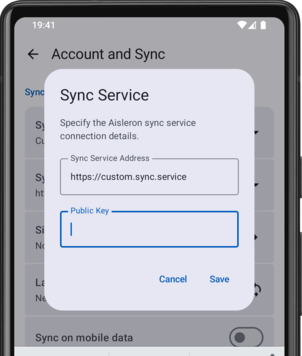
The Sync Service address dialog allows you to specify the required details for a custom sync service. Two parameters are required:
Sync Service Address: The address (url) of your custom sync service. Public Key: The publishable key required to connect to the service.
Both these values can be obtained from the service dashboard:
- Open your instance dashboard in a browser.
- On the dashboard, find the project url under the title. USe this as the Sync Service Address
- Click Copy next to the url and find the Publishable key. Use this as the Public Key.